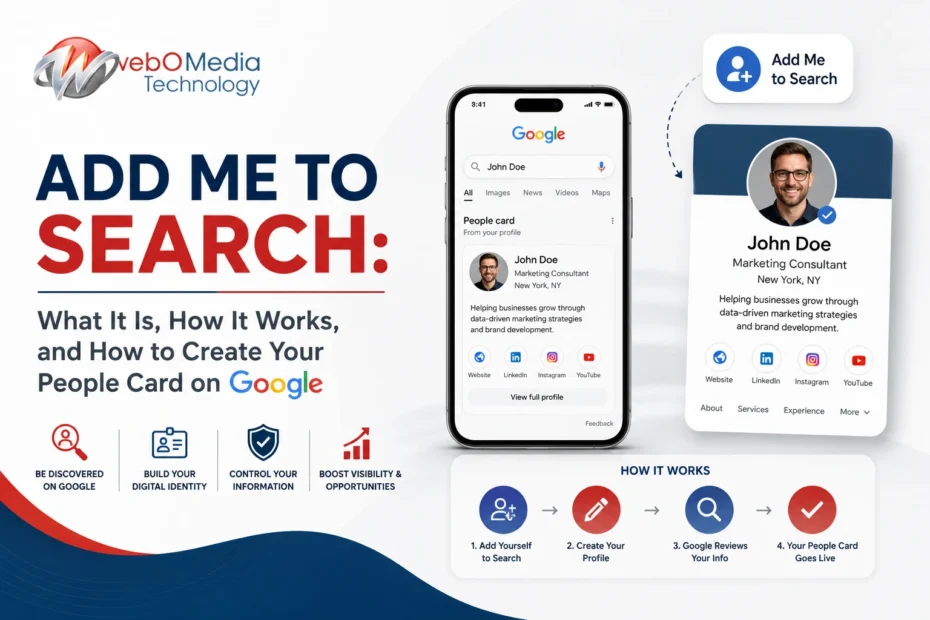

Have you ever searched for someone’s name on Google and noticed a profile card displaying their photo, profession, website, and social media links? That’s called an “Add Me to Search” profile, also known as a Google People Card.
This feature allows individuals to create a public profile that appears in Google Search results, making it easier for others to find accurate information about them online. Whether you’re a freelancer, entrepreneur, digital marketer, student, influencer, or business professional, creating a People Card can help strengthen your online presence and personal brand.
In this guide, you’ll learn what Add Me to Search is, how it works, who can use it, and the step-by-step process to create and optimize your own Google People Card.
What Is “Add Me to Search”?
Add Me to Search is a Google feature that enables individuals to create a virtual profile card that can appear directly in Google Search results when someone searches for their name.
Think of it as your digital business card. Instead of relying on scattered social media profiles or websites, Google displays a centralized card containing your professional information, making it easier for people to discover and connect with you.
A People Card can include details such as:
- Your full name
- Profile photo
- Profession or job title
- Short bio
- Business information
- Website link
- Social media profiles
- Contact details (optional)
- Location
Its primary purpose is to help individuals establish a verified and trustworthy online identity.
Why Is Add Me to Search Important?
In today’s digital world, your online presence often creates the first impression before someone meets you in person. Potential clients, employers, recruiters, and business partners frequently search for names on Google before making decisions.
Having a People Card allows you to control the information people see instead of leaving them to browse multiple unrelated search results.
Some of the biggest benefits include:
- Improves personal branding
- Increases online visibility
- Makes networking easier
- Builds professional credibility
- Helps clients find accurate information
- Enhances digital reputation
- Supports freelancers and entrepreneurs
For professionals trying to establish authority online, creating a People Card can be a valuable addition to their overall branding strategy.
How Does Add Me to Search Work?
Google’s People Card feature allows eligible users to create a simple profile using their Google account. Once submitted and approved, Google may display the card when users search for your name.
The card gathers information you provide and presents it in a structured format within search results.
However, creating a People Card does not guarantee instant visibility. Google’s algorithms evaluate multiple factors, including relevance, uniqueness, and authenticity, before deciding when and where to display it.
This is why providing complete and accurate information is essential.
Who Can Use Add Me to Search?
The feature is designed for individuals rather than businesses.
It is particularly useful for:
- Freelancers
- Digital marketers
- Graphic designers
- Consultants
- Bloggers
- Influencers
- Students
- Teachers
- Small business owners
- Content creators
- Job seekers
- Public professionals
If you want people to find verified information about you online, a Google People Card can help improve discoverability.
How to Add Yourself to Google Search
Creating a People Card is a straightforward process and takes only a few minutes.
Step 1: Sign in to Your Google Account
Use the Google account you want associated with your public profile.
Step 2: Search for “Add Me to Search”
Open Google Search and type Add Me to Search.
If the feature is available in your region, Google will display an option to create your People Card.
Step 3: Enter Your Information
Fill in your profile with accurate details, including:
- Name
- Occupation
- Short description
- Profile image
- Website
- Social media profiles
- Work experience
- Education
- Location
Adding more relevant information helps create a stronger and more complete profile.
Step 4: Preview Your Card
Before publishing, review your details carefully to ensure everything is correct and professionally presented.
Step 5: Publish Your People Card
Once satisfied, submit your profile. Google will process your information, and your card may begin appearing in search results over time.
Tips to Optimize Your Google People Card
Creating a profile is only the first step. Optimizing it improves your chances of making a positive impression.
Here are some best practices:
- Use a high-quality professional photo.
- Write a concise and informative bio.
- Include your official website.
- Add verified social media profiles.
- Keep information updated.
- Highlight your expertise and achievements.
- Use consistent branding across all platforms.
A complete and authentic profile is more likely to build trust with people searching for your name.
Common Reasons Your People Card Doesn’t Appear
Some users create a People Card but don’t immediately see it in search results.
Possible reasons include:
- The feature is unavailable in your country.
- Your profile information is incomplete.
- Google is still processing the submission.
- Your name is highly competitive.
- Your card doesn’t meet Google’s quality standards.
In many cases, waiting a few days and ensuring your information is accurate resolves the issue.
Add Me to Search vs Google Business Profile
Although they may seem similar, these two Google features serve different purposes.
| Add Me to Search | Google Business Profile |
|---|---|
| Designed for individuals | Designed for businesses |
| Creates a personal identity | Creates a business listing |
| Focuses on personal branding | Focuses on local SEO |
| Appears when searching a person’s name | Appears for business and local searches |
| Includes personal information | Includes business hours, reviews, and location |
Using both features can strengthen your online presence if you’re an entrepreneur or freelancer.
Best Practices for Building a Strong Online Identity
A People Card should be part of a broader personal branding strategy.
To maximize your visibility:
- Create a professional website.
- Maintain active LinkedIn and social profiles.
- Publish helpful content regularly.
- Use the same name and profile photo across platforms.
- Build authority in your industry.
- Keep your information consistent and up to date.
Consistency across digital channels helps establish trust and makes your personal brand more recognizable.
Frequently Asked Questions
1. What is Add Me to Search?
Add Me to Search is a Google feature that allows individuals to create a People Card displaying their professional information directly in Google Search results.
2. Is Add Me to Search free?
Yes. Creating a Google People Card is completely free for eligible users.
3. Who should create a People Card?
Freelancers, entrepreneurs, students, consultants, creators, and professionals looking to improve their online visibility can all benefit from having one.
4. Does creating a People Card guarantee Google rankings?
No. While it improves your online presence, Google decides when and where to display your People Card based on its ranking systems and quality standards.
5. Can I edit or remove my People Card?
Yes. You can update or delete your People Card anytime through your Google account.
Final Thoughts
The Add Me to Search feature offers a simple yet effective way to strengthen your personal brand and improve your visibility on Google. By creating a complete and authentic People Card, you make it easier for clients, employers, colleagues, and potential partners to find accurate information about you.
As personal branding becomes increasingly important in the digital age, maintaining a professional online identity is no longer optional—it’s a valuable asset that can open new opportunities and help you stand out in a competitive landscape.